It starts from the film
It reads your script, cast, wardrobe, props and locations, so a frame arrives knowing who is in it and where they stand.

Video production still runs on a 2022 workflow - a broken, disconnected chain of documents and files that need a 30-minute conversation to communicate what links with what, and why. If a detail is changed, a human has to update the whole stack. That is the industry standard. It shouldn’t be.
StoryboardCanvas is a complete web application suite - a productivity and workflow toolkit for video, motion picture, TV and film production, a complete script-to-shoot-day and wrap software suite for writers, producers, directors and all the crew involved in the process. A chain of connected, synchronized files that communicate with each other, updating suite-wide via a cross-app spine in 0.3ms, saving teams time, and saving budget for the items that really matter - keeping everyone on the same page 100% of the time.
Change a detail once and every app around it updates. No downloads - all you need is a browser and a connection. Now live worldwide in 26 languages.
Powered by DollyAI™, your omnipresent assistant.
“Imagine the Google app suite, ChatGPT and a crew of professional filmmakers had a wild night of passion - their offspring would look something like StoryboardCanvas AI’s software suite…”


StoryboardCanvas runs beautifully in every modern browser - Chrome, Edge, Safari, Firefox and Brave - with nothing to install and no plugins to configure. But we build and test on Google Chrome first, so for the fastest, smoothest experience Chrome is the one we recommend.
Download the official DollyAI™ Chrome extension to add your production's assistant to your browser - built on the web platforms the world trusts.
Every app, every tier
Every plan from Hobbyist to Enterprise ships the full suite. Tiers differ on seats, monthly credits, cloud storage, white labelling and queue priority - never on capability.
The morning briefing your bond company will read first.
Twelve industry-canonical categories, tagged in seconds.
Top sheet to bottom line. Variance the night before.
Stripboard scheduling your 1st AD will not fight you on.
DPRs, BTS gallery, the on-set log that organises itself.
Auto-built. Email + SMS dispatch. Weather built in.
Roster, deal memos, character bibles. Cross-app synced.
Scouting, permits, logistics. Every scout, mapped.
Inventory + costume continuity in one searchable library.
Picture cars and unit. Insurance, plates, drivers.
Crew + equipment manifest. The on-set source of truth.
The screenplay editor that writes the breakdown for you.
Built from your script. Lens, framing, every shot.
Storyboard frame editor. Boards your director will sign.
Professional brushes. GPU canvas. In your browser.
Style-locked image generation. Your own custom artist.
Screenplay to playable animatic in one click.
The launchpad. Every project at a glance.
Every asset, every version, every project. Searchable.
Real-time channels, project-scoped. No more lost threads.
Not a trial. Not a demo. All twenty apps - script, breakdown, storyboard, stripboard, budget, call sheets, shoot day, wrap - open, unlocked, and yours to keep.
The only thing Free doesn’t include is AI credits - DollyAI is the one feature that costs real money per use. Add a Booster from £5 the day you want it, or never.

What your stack really costs
Final Draft, StudioBinder, Movie Magic, Frame.io, Adobe, Storyboard Pro, Boords, Wrapbook - eight subscriptions, eight logins, eight versions of the truth. Add up what that stack really costs you a year, then compare.
The legacy stack · 1 seat · 1 yr
Eleven separate subscriptions across eight vendors - every figure sourced from their own public pricing pages.
StoryboardCanvas · Solo annual
£4,253 saved - straight back into the budget
Twenty apps, one project file, one invoice. The maths only goes one way.
Every other image tool starts from a blank prompt box and forgets your film the moment it answers. Ours starts from the film.

It reads your script, cast, wardrobe, props and locations, so a frame arrives knowing who is in it and where they stand.
Pick a hand and every frame holds it, shot after shot. One look, locked, across a whole board.
Upload your reference and the Style Bible learns your line, your tone and your colour. It becomes your artist.
Aim the camera in 3D, set the angle and the height, break the 180° line on purpose. The directive writes itself.
Posters, key art, concept paintings, mood boards, EPK stills and title cards, all in the same locked hand.
Full commercial rights to everything you generate, and we never train on your work. Ever.
Built by a storyboard artist who got tired of arguing with a prompt box.
Open the actual software on Origin: Ascension, a finished short film, and explore every app exactly as the crew left it. Read the script, walk the boards, open the budget, print the call sheet. Fully read-only, with no sign-up. Nothing you touch is saved.
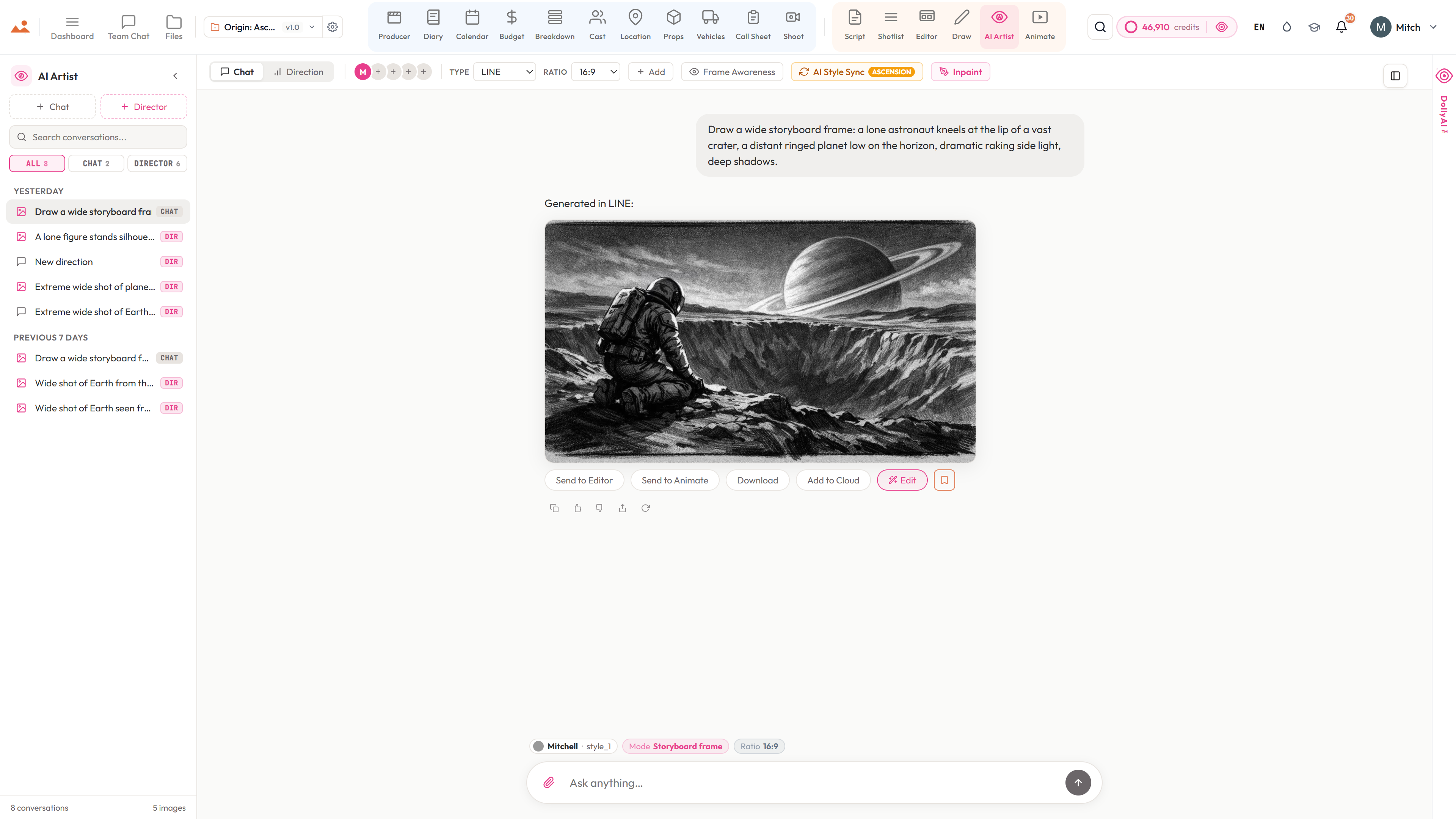
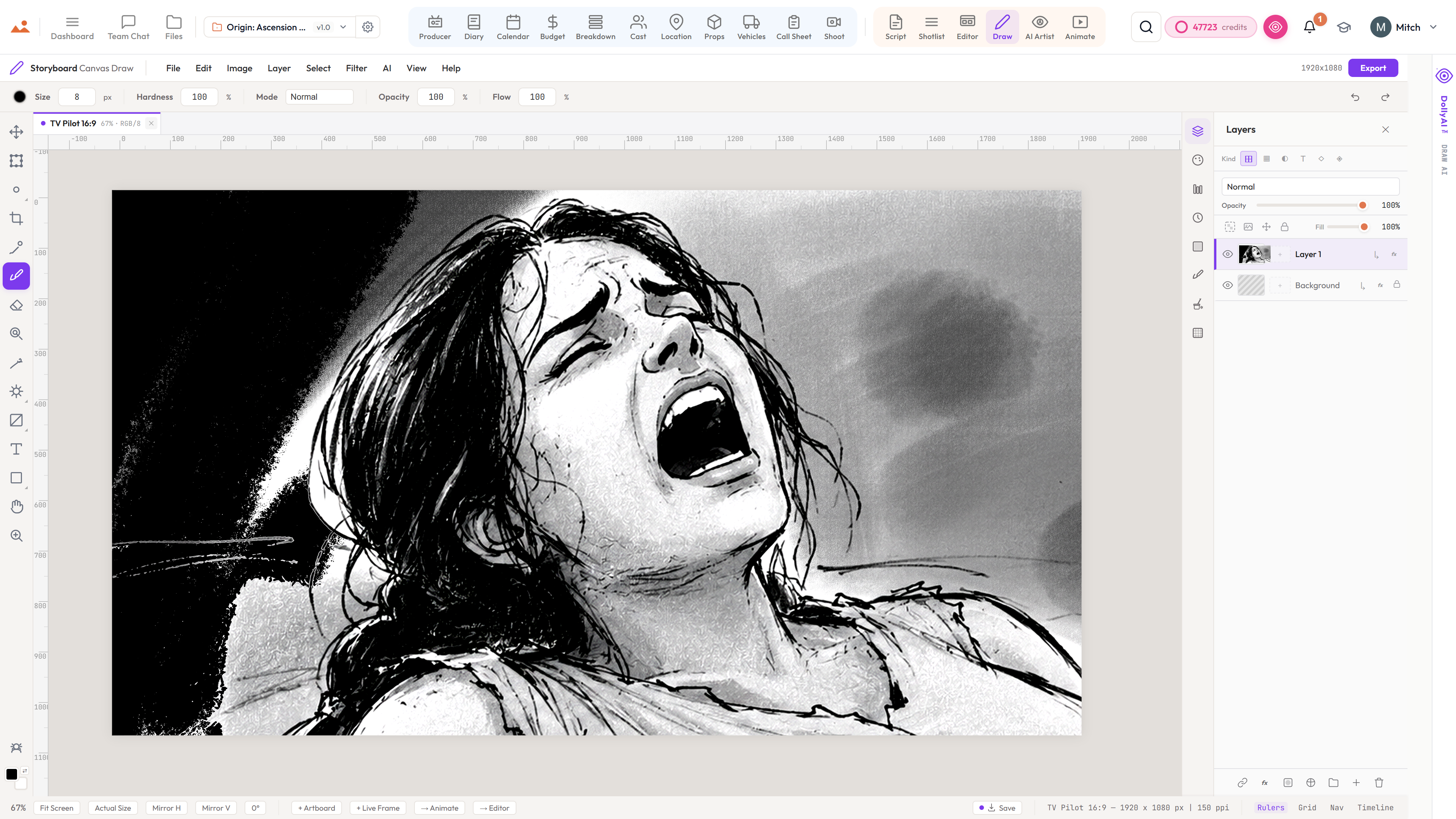
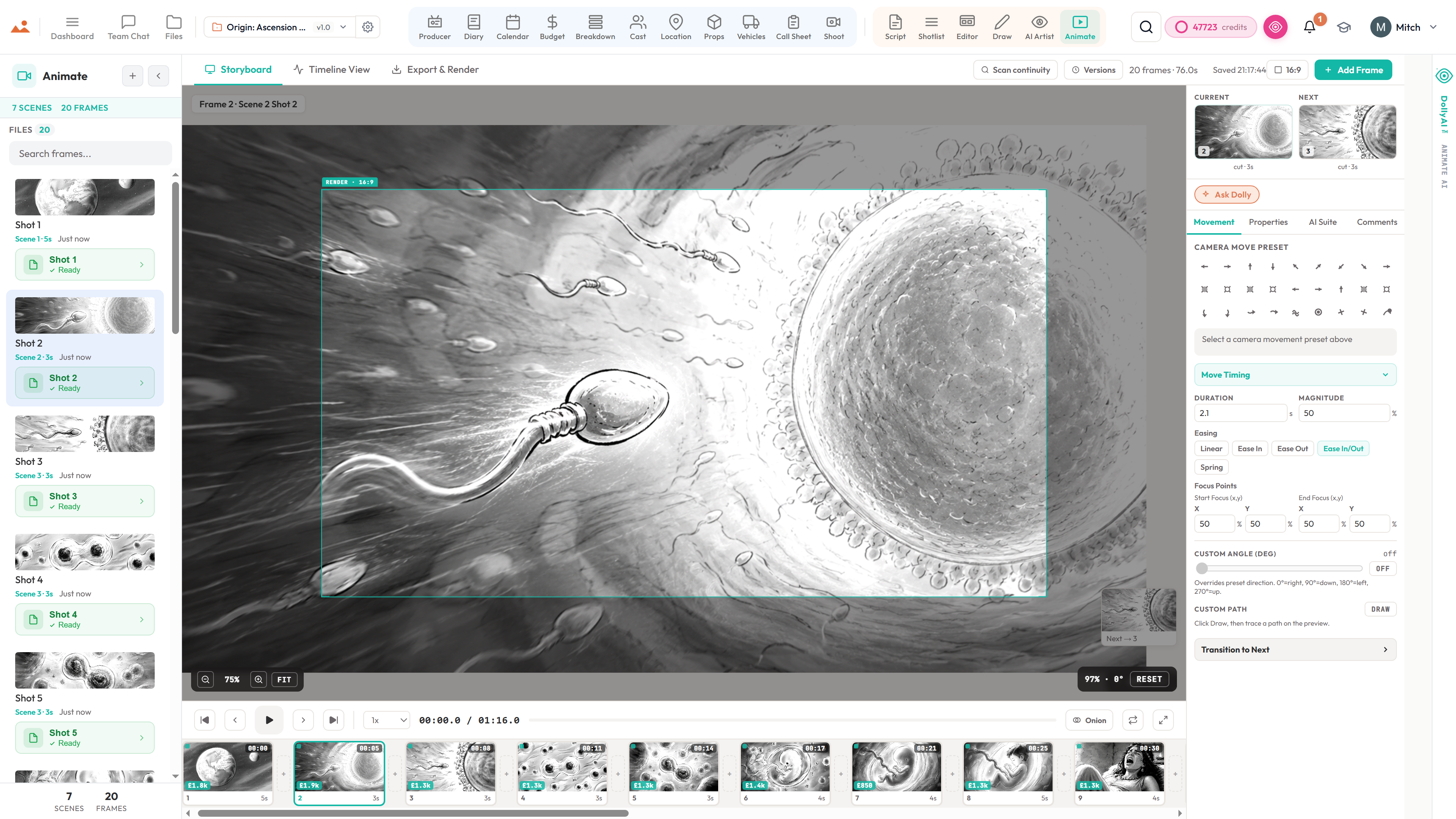
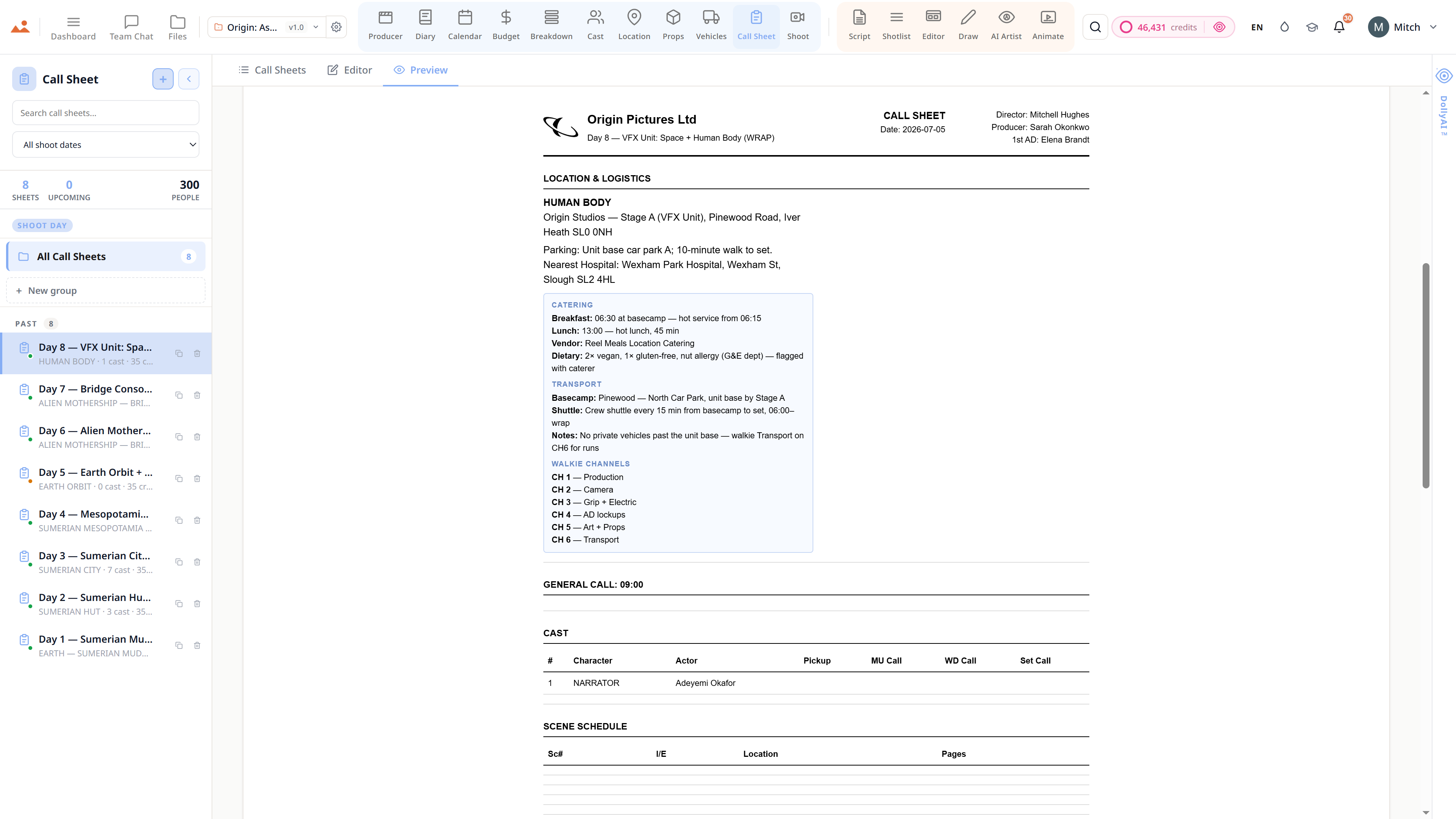
Script · breakdown · boards · animatic · call sheets · budget
The demo is a view-only copy shared for exploration. Some features need a paid subscription to run.
Build your own style - or pick from ours.
Mitch has spent nearly two decades turning scripts into frames for advertising, film and branded content, long before a camera rolls. The job was never just drawing. It is emotion, pacing, composition and the language of cinema.
He used the popular AI models on his own paid jobs, and they kept missing what a board is for. So he built this one.
You can talk to it in chat, or open the Frame Builder in Director mode. Every dropdown is already wired to your scenes, cast, props and notes, so your prompt is built in seconds.
His line, tone and colour ship as the house style. Pick one of them, or train your own artist in the Style Bible. Either way, the Style-Lock Engine holds every frame to that one hand, whether you want clean line, greyscale tone or full colour.
Twenty frames of a real production - drawn, locked and made in StoryboardCanvas.


The Style-Lock Engine
Mitch is our founder and a working storyboard artist, and he drew every reference frame himself. The line, the tone and the colour are one person's hand, so the look you get is real craft rather than something scraped off the internet.
Drop in a few reference frames and run AI Style Sync. Your studio's look becomes a locked artist you can pick from any time, exactly like Mitch's, and every future board can be drawn in it.
Your locked style sits above your prompt rather than beside it. Ask for photoreal and the board stays on style, because the locked look wins every frame, every time.
Every frame is scored against the reference for line, tone and colour. The instant one falls off the look, the engine redraws it, so drift never reaches your board.
Repaint one corner of a frame and only that region is redrawn. It comes back in the same locked hand, and the rest of the board is left exactly as you had it.
The Frame Builder reads the scenes, characters, props and notes already in your project. A board lands with your script's own detail baked in, instead of whatever a generic prompt happened to invent.
One locked style, every creative mode:


Or lock your own. Drop a few reference frames, run AI Style Sync, and the engine holds every future frame to your studio look - across storyboards, posters, concept art and key art alike.


Dolly reads your project once - script, breakdown, schedule, call sheets, storyboards, every connected app - and stays mounted on every page from there. And she remembers: locked creative decisions, your standing taste, the bible of your film, carried between sessions.
Ask her anything and she answers from your live production data, not a guess - then offers to act on it. Agent mode proposes the addition; nothing is written until you approve it. Flip on double-check and she scores her own answer against the project's real facts before you ever see it. And when a question belongs to a specialist, she brings in the family - Marlowe on script, Sable on the money, Cass on the day, Indra on casting, Vee on continuity.
The decisions are yours. The repetitive work - the re-typing, the cross-checking, the "wait, did I update that everywhere?" - is what Dolly's there to take. On every paid plan, in every app.
Script, breakdown, schedule, cast, locations - all in sync. Edit one, the rest follow.
Locked decisions, your standing taste, the creative bible - carried between sessions, for the whole production.
Agent mode answers from live project data and proposes additions. Nothing is written until you approve each one.
Flip on double-check and every substantial answer is scored against your project's real facts - and revised - before you see it.
Marlowe (script), Sable (line producer), Cass (1st AD), Indra (casting), Vee (continuity) - specialists one click away.
Director's notes on your storyboard frames, plus a risk-ordered production briefing whenever you ask.
AGENT MODE - ask → she proposes with a field-by-field preview → you approve in one click → undo in one click. Plus the proactive modes: hourly production watch, a morning briefing, and a weekly director's review of your boards. She can even read the open web and bring back the references.
Every AI action shows its price before you click and charges only on success - quick chat starts at a quarter of a credit.
WORKING IN THE BACKGROUND
Scans every active project against its own risk rules - unsigned deal memos, a shoot day under-staffed, a budget line about to break - and flags it before it costs you.
Each day she assembles what needs your attention - self-checked against your real production data - and drops it straight into your notifications.
She looks at your storyboards with a director's eye and leaves notes on composition, coverage and continuity drift - a standing review you never have to ask for.
Every change she proposes waits in an inbox, across sessions - approve, undo, or dismiss whenever you're ready. Nothing is written without your say-so.
Hand her a multi-step goal and she drafts the plan; one approval runs the whole thing, checkpointed so it resumes exactly where it left off.
She remembers locked creative decisions and your standing taste between sessions, and tidies her own memory each week so it sharpens instead of bloating.
Background work is platform-gentle and never spends a credit without an owner - and you can turn any of it on or off per project.

Twenty apps. One project. Zero replacements.
Built for filmmakers who want their tools to talk to each other and their AI to work for them, not over them. From £15/month - script to screen, on one bill.
Bi-weekly cadence. Public roadmap. Honest changelog. Every quality-of-life upgrade ships to every plan, retroactively. Here's the actual board.
Alpha just landed, on top of a fortnight of releases. Every entry is a real commit, dated, deployed.
The next two fortnights, scoped, dated, public. No NDA pitches.
Alpha is live - and this is everything still to come during it. The vote buttons are real: tap one and the count climbs for everyone. Top askers ship first.
All data and claims within this website are based on current software. Go have a look around in our read-only DEMO - please note some of the apps need a paid subscription. Track the developers in the changelog. Thanks for the on-going support - every share helps us keep the prices where they are.
We already know every cast, crew, department, and contributor on your production - we had to, to run your call sheets. So we built a button. Click it and you get a complete production credits roll, alphabetised by department, properly formatted for film and TV conventions, ready to drop into your edit.
Available on every paid tier · no extra cost

Each app carries its own colour in the in-app nav so you always know where you are. The project file underneath stays one - change a scene heading and every other app updates with you.
Ten apps for breakdown, budget, schedule, cast, crew, locations, props, vehicles, equipment, and the diary that saves your bond company.
AI script breakdown software, in one pass.
Production office software, automated.
Film budget software, tax credits to bid.
Cast management with a self-tape portal.
Location management and scouting.
Prop management and costume continuity.
Picture-car and unit-vehicle management.
Film scheduling with a stripboard.
Call sheet software, auto-generated.
Equipment and crew, on shoot day.
Production diary, DPRs and continuity.
Six apps for the writers, directors, DPs, and visual storytellers - with DollyAI™ riding shotgun the whole way.
Screenplay software that writes the breakdown.
AI shot list with lens planning.
Storyboard editor and frame canvas.
Pro storyboard drawing software.
AI storyboard generator, style-locked.
Storyboard to animatic software.
Dashboard, files, team chat, cloud library - the connective tissue every other app rides on.
Production dashboard for every project.
Production file manager and asset library.
Production team chat, per department.
Cloud asset library, every project.

FAQ
StoryboardCanvas is the complete script → shoot day software suite - 20 production apps covering the entire pipeline from first draft to wrap, powered by our proprietary IP: DollyAI™ (cross-module AI director), the Style-Lock Engine, the AI Image Engine (eight generation modes), Canvas Draw (GPU brush engine), Frame Brain (animate-aware AI), the Cross-App Spine, the Brand Kit Engine, and the IATSE Turnaround Engine. It's live and open to everyone - sign up, pick a plan, and start your production today. Every app is included on every tier; annual billing saves roughly 20%.
Six director apps (Script, Shotlist, Editor, Draw, AI Artist, Animate). Ten producer apps unified under one production stack (Breakdown, Cast, Locations, Props, Vehicles, Calendar, Call Sheet, Shoot, Diary, Budget). Four platform apps that tie them together (Dashboard, Files, Team Chat, Cloud Library). Twenty in total. They share one project file - change a scene heading once, and the breakdown, schedule, call sheet, and storyboard all update themselves.
It's a full screenplay word-processing suite - not a glorified textarea. Typed screenplay blocks with Tab cycling, intelligent element assist, scene navigator, dual dialogue, revision mode with industry-coloured pages and locked scene numbers, autosave history with named versions and editable drafts, comments with @-mentions, real-time multi-user collaboration, approval workflows, sides generation, episodic support, readthrough TTS, File/Edit/View/Help menus, and import/export for FDX, Fountain, Celtx, HTML, RTF, and PDF. Built to replace Final Draft entirely.
Those are single-purpose tools. StoryboardCanvas covers 22 out of 22 capabilities on our comparison matrix - Final Draft covers 3, Celtx 9, StudioBinder 14, Movie Magic 4, Gorilla 4, Boords 4, Storyboarder 3, LTX Studio 6, Midjourney 4. Change a scene heading once, and every dependent document updates. No copy-paste between five different logins.
DollyAI™ is not a chatbot. She's the AI director layered into every app in the suite - 200+ typed, prompt-engineered actions across every route, with selection awareness (knows which scene / shot / character / prop you've clicked) and image awareness (can see your storyboard frames, character photos, location scouts, props, vehicles, costumes, behind-the-scenes media, and recent AI generations). She's powered by a six-engine intelligence stack: production memory (remembers your film and your taste across sessions), agent mode (proposes changes with a field-by-field preview, your approval, and one-click undo), a self-critique loop, the AI Family of specialist department heads you can bring in by name (Marlowe, Sable, Cass, Indra, Vee), proactive briefings (an hourly watch, a self-checked morning briefing, a weekly frame review and an approval inbox), and deeper vision that reviews your actual frames. She can even read a web page or run a search when you ask. Per-row Ask Dolly menus on the major tables. Every action starts with a parallel 16-table project-context fetch so she answers with full awareness of your script, breakdown, cast, schedule and visual style bible - not generic chat. Streaming responses. Credit-gated, micro-billed from a quarter-credit. Included on every tier.
A world-beating web-based GPU-accelerated drawing engine with a custom brush builder. 450+ stock brushes across ink, pencil, oils, watercolour, charcoal, airbrush, gouache, chalk, markers and bristle sets. 120+ paper and canvas textures - cold-press, hot-press, rough, smooth. 15+ blend modes, non-destructive layers with groups / masks / alpha locks, adjustment layers, full stylus pressure + tilt, five smoothing modes, Adobe ABR brush-file import, 60fps rendering - all in your browser with no plugins, no install, no download. Start with stick figures for quick blocking or paint a finished frame.
Credits are the fuel for AI actions - every DollyAI™ chat, script action, breakdown, shotlist parse, and style-locked frame generation consumes credits. Simple actions cost 1–3 credits, image generations and long-context actions 10–25. Your monthly allocation refreshes on your billing date: Free comes with none (add a Booster from £5 whenever you want DollyAI), Hobbyist, Solo and Team credits are use-it-or-lose-it, Studio gets 25% rollover, and Agency, Network and Enterprise get 50–75%. Booster credits are different: they are kept in a separate balance that no monthly refresh ever resets, on any plan including Free, so credits you have paid for stay yours until you spend them. Upgrading carries unused credits across automatically.
Free, plus seven paid tiers: Free (£0 forever), Hobbyist (£19/mo · gateway), Solo (£39/mo), Team (£99/mo), Studio (£269/mo · most popular), Agency (£599/mo), Network (£1,599/mo) and Enterprise (£3,329/mo · self-serve). Annual billing locks in 20% off any paid tier. Every app, every feature, every export format is available on every tier, including Free - no feature gating, ever. Tiers differ only on seats, AI credits and credit rollover. Free gets the same revision-mode Script app and the same DollyAI™ as Enterprise; the only thing it doesn't come with is a monthly credit allocation, and you can buy a Booster from £5 any time.
Annual billing locks in 20% off any paid tier - equivalent to 2.4 months free over the year. Hobbyist £15/mo billed annually (£180/yr) versus £19/mo monthly. Solo £31/mo (£372/yr) versus £39/mo. Team £79/mo (£948/yr) versus £99/mo. Studio £215/mo (£2,580/yr) versus £269/mo. Agency £479/mo (£5,748/yr) versus £599/mo. Network £1,279/mo (£15,348/yr) versus £1,599/mo. Enterprise £2,663/mo (£31,956/yr) versus £3,329/mo. Cancel any time from the billing portal and keep access through the end of your paid period.
Yes. Script imports FDX (Final Draft), Fountain, Celtx, PDF, DOCX, RTF, and HTML - full screenplay fidelity. Breakdown imports StudioBinder CSVs. Schedule and stripboard import from Movie Magic Scheduling and Gorilla Scheduler CSV exports - vendor auto-detected, scene #, I/E, day/night, location, cast, page count, and duration all mapped automatically. Cast sheets from CSV/XLSX. Images from any common format. You can start mid-production without losing a single scene, strip, or deal memo.
Your account, billing and the whole marketing site work on any device, including your phone. The production app suite is built for a bigger canvas - a tablet (iPad 10.2" and up), laptop or desktop - because the script editor, stripboard, call sheets and drawing canvas genuinely need the room to work properly; on a smaller screen we show a friendly note pointing you to a larger device rather than cramming the UI. Canvas Draw runs with full stylus pressure + tilt on iPad, Surface and any Chromebook or Windows tablet. The on-set surfaces - call sheets, Shoot Day Live arrival check-in, diary entries, BTS photo capture - are tuned for the tablet you'll actually carry on set. No native install required, ever.
Real-time presence with live cursors and selection highlights across every app. Per-frame, per-line, and per-row comments with resolve/reopen threads, @-mentions, and email notifications. Review sessions with share tokens for external reviewers - they can approve, reject, or comment without creating an account. Role-based permissions (Owner, Editor, Commenter, Viewer). Team chat with channels and reactions. Full audit log.
You retain full commercial rights to everything you create on every paid tier. We never train on your projects. Your style bibles, scripts, cast data, and generated frames are yours. We use append-only audit logs for credits and immutable version snapshots for documents so nothing is ever silently deleted or altered.
Three-day grace period with full access, then read-only mode (you can still view and export everything), then after 14 days the account suspends. No data is ever deleted - reactivate any time and everything is exactly where you left it.
No - and we're unapologetic about it. Free-tier theatre costs us real money running your AI calls, and it costs you real time evaluating a deliberately crippled version of a tool you'd actually use. The apps aren't speculative: StoryboardCanvas replaces Final Draft, StudioBinder, Movie Magic Scheduling, Gorilla Budget, Filmustage, and Boords in one suite. It pays for itself on your first short, let alone your first feature. Hobbyist starts at £19/mo (or £15/mo billed annually) - full capability from day one. Solo at £39/mo (£31 annual) is the recommended starting tier with team-collaboration upgrades. Cancel any time from the billing portal and keep access through the end of your paid period. No retention traps, no guilt prompts. You can also explore a finished, read-only demo production right now - no sign-up, no card.
Yes - open the live read-only demo from the homepage. It loads a complete, finished production (script, breakdown, 8 shoot days, full cast and crew, call sheets, a £3.4M budget, storyboards and an animatic) so you can click through every app on real data without signing up or entering a card. You can look at everything; saving and AI generation are the parts you unlock when you join.
It's a full line-producing ledger, not a spreadsheet - twelve tabs covering Cost Report, Variance, Forecast, Top Sheet, Purchase Orders, Petty Cash and Rate Cards, plus a Tax Incentive Estimator that ranks film-tax-credit jurisdictions and compares up to three side by side, a Fringe Matrix with SAG-AFTRA / IATSE / DGA / non-union and BECTU preset packs, a Cashflow Schedule with peak-week and budget-exhaust warnings, an AICP Bid Builder that maps every line to a chart-of-accounts code and prints an agency-ready firm bid, and a Union Rate Finder with 30 dated 2026 scale rates and a live cost calculator. Per-line traffic-light readiness, contract uploads, VAT / locale tax handling and accounting exports (generic ledger, Xero, QuickBooks, and an authorised-payments bank file) are all built in. These tools are informational aids - you stay responsible for filings in your jurisdiction.
Yes. The Shoot app has a Safety tab with a 5×5 risk-assessment matrix and AI safety briefings; the Diary runs a due-diligence Compliance board with a daily safety score, an hours / turnaround / meal / daylight / incident check per shoot day, and an incident log. Cast carries a compliance document vault with a 30/14/7/1-day expiry ladder for COIs, work permits and releases, plus a child-performer work-hours tracker with jurisdiction-banded limits. The Calendar flags IATSE turnaround violations automatically. It's organisational support, not legal advice - local law remains your responsibility.
Yes. Script Distribution mints a separate watermarked link for each recipient - every page is stamped with that reader's name, links expire on a date you set, you can revoke any of them instantly, and you see download telemetry per recipient so a leaked PDF traces straight back to who shared it. There's also an AI Clearance Scanner that flags brands, real people, music, trademarks and artwork in your script for E&O review before you go to camera.
The marketing site and the app interface ship in fifteen languages (English, Spanish, French, German, Italian, Portuguese, Dutch, Polish, Turkish, Russian, Japanese, Korean, Chinese, Hindi and Indonesian), switchable from the language chip - your account, the demo and the everyday app chrome all follow your choice. Prices show an estimate in your local currency from live exchange rates, while billing itself is taken in GBP. Your actual work is never translated - your script stays in whatever language you wrote it.
Each paid tier includes a number of seats and a per-seat add-on price (Solo +£19/mo per seat up to 3, Team +£15 up to 10, Studio +£12 up to 25, Agency +£10 up to 50, Network +£8 up to 100). Seats are billed when you add them and end at the close of the current billing period when you remove one. The account owner controls exactly which apps and how many credits each seat can use, and read-only viewers are unlimited and free on every tier - bring in financiers, clients or department heads to look without paying for a seat.
No - that's the whole point. The cross-over importer takes a drop of almost anything: Movie Magic Scheduling, Final Draft, StudioBinder, Gorilla, Yamdu, Celtx or any screenplay file. We recognise the source, run an AI breakdown and route the result into the right apps automatically (Movie Magic stripboards come in structured, with no AI credits charged). Script also imports FDX, Fountain, Celtx, PDF, DOCX, RTF and HTML at full fidelity. You can pick up mid-production without losing a scene, strip or deal memo.
Approved storyboard frames flow straight into Animate, where you drop them on a timeline with 27 camera-move presets, transitions, easing (including Bounce), scratch audio and timing, then export to MP4 / MOV / WebM with audio plus editorial hand-off formats - XMEML (Premiere / DaVinci), FCPXML (Final Cut Pro X), EDL, OpenTimelineIO and SRT captions. The whole creative spine runs Script → Shotlist → Storyboard Editor → Animatic with one project file underneath, so nothing is re-typed or re-imported between stages.
The Producer app is the page a producer keeps open every morning: a live scorecard, hot-cost rollups, an AI overtime predictor, schedule-risk scoring, a deliverables tracker (ProRes master, DCP, stems, captions, QC, chain-of-title, E&O and more on a click-along delivery pipeline), an EPK / sales hand-off package, a PO command centre with approval routing, an immutable cross-app audit trail of every change, and a multi-project portfolio view. Weekly cost reports and DPRs assemble themselves from the spine and are ready to email by 6am.
Beyond your statutory consumer rights, refunds are considered case by case as a goodwill gesture - just contact us. You can cancel any subscription from the billing portal at any time and keep full access through the end of the period you've already paid for; we never delete your data when you cancel.
